Description
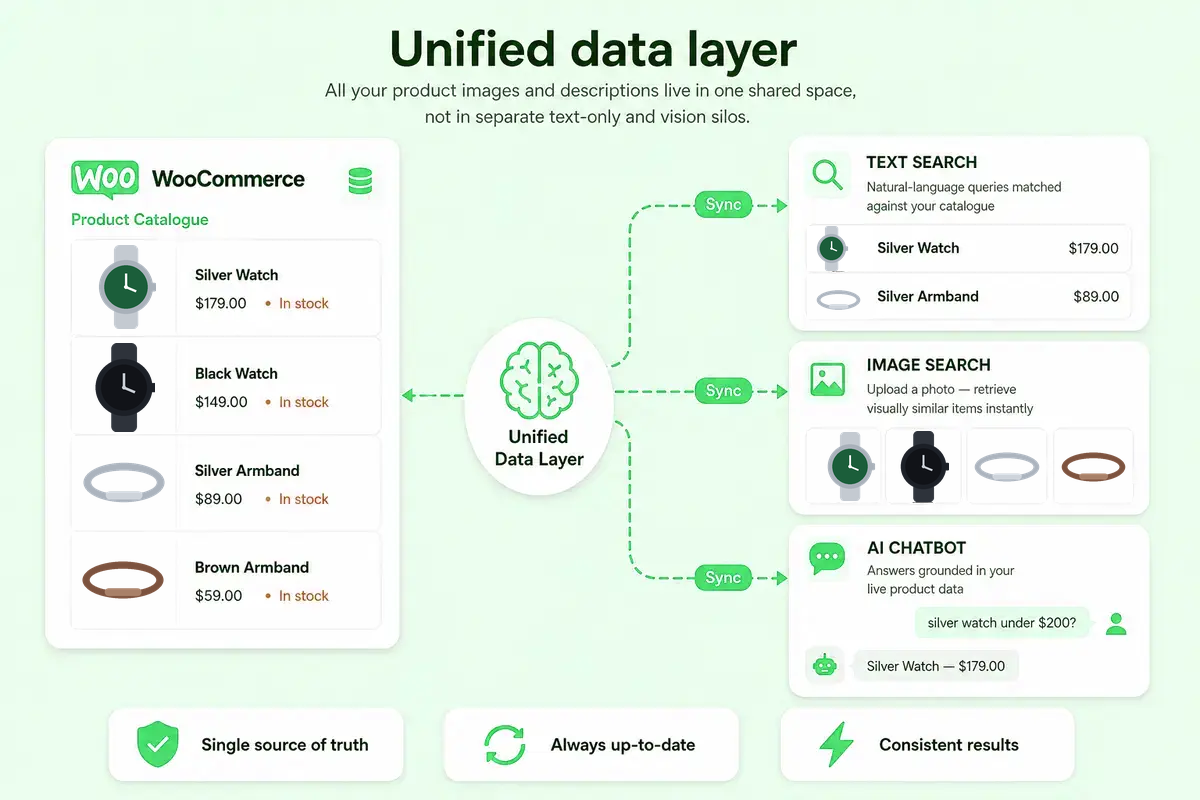
AskAgento connects your WooCommerce store to a unified shopping data layer. Your catalogue is synced once; search, filters, labelling, recommendations, chat, and agent tools all use the same understanding of what you sell.
Why AskAgento
- Unified layer — Text and image data live in one space, so natural-language search, visual similarity, and chat retrieval stay aligned.
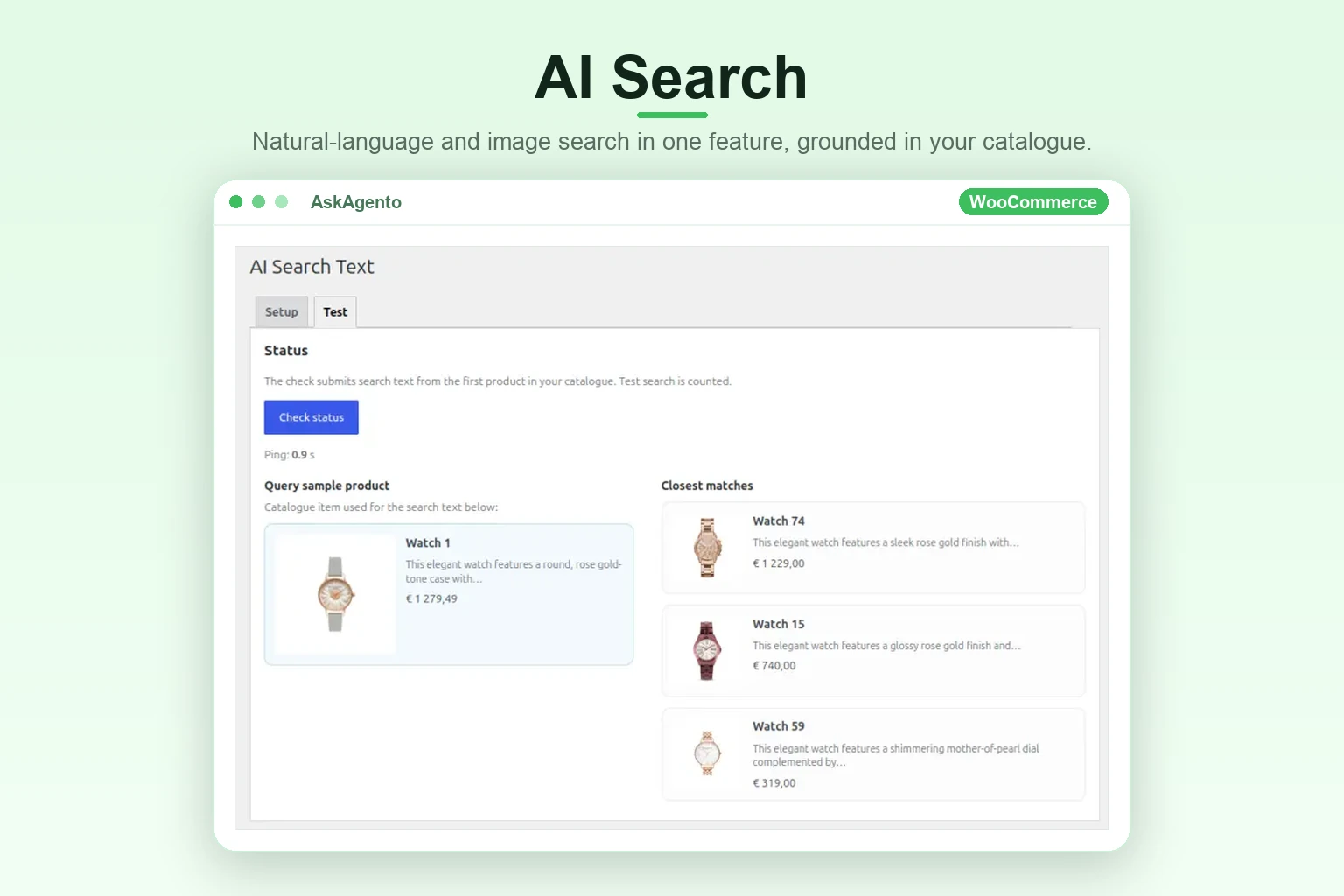
- AI-powered search — Natural-language and image queries return relevant products even when exact keywords don’t match, so shoppers find what they mean.
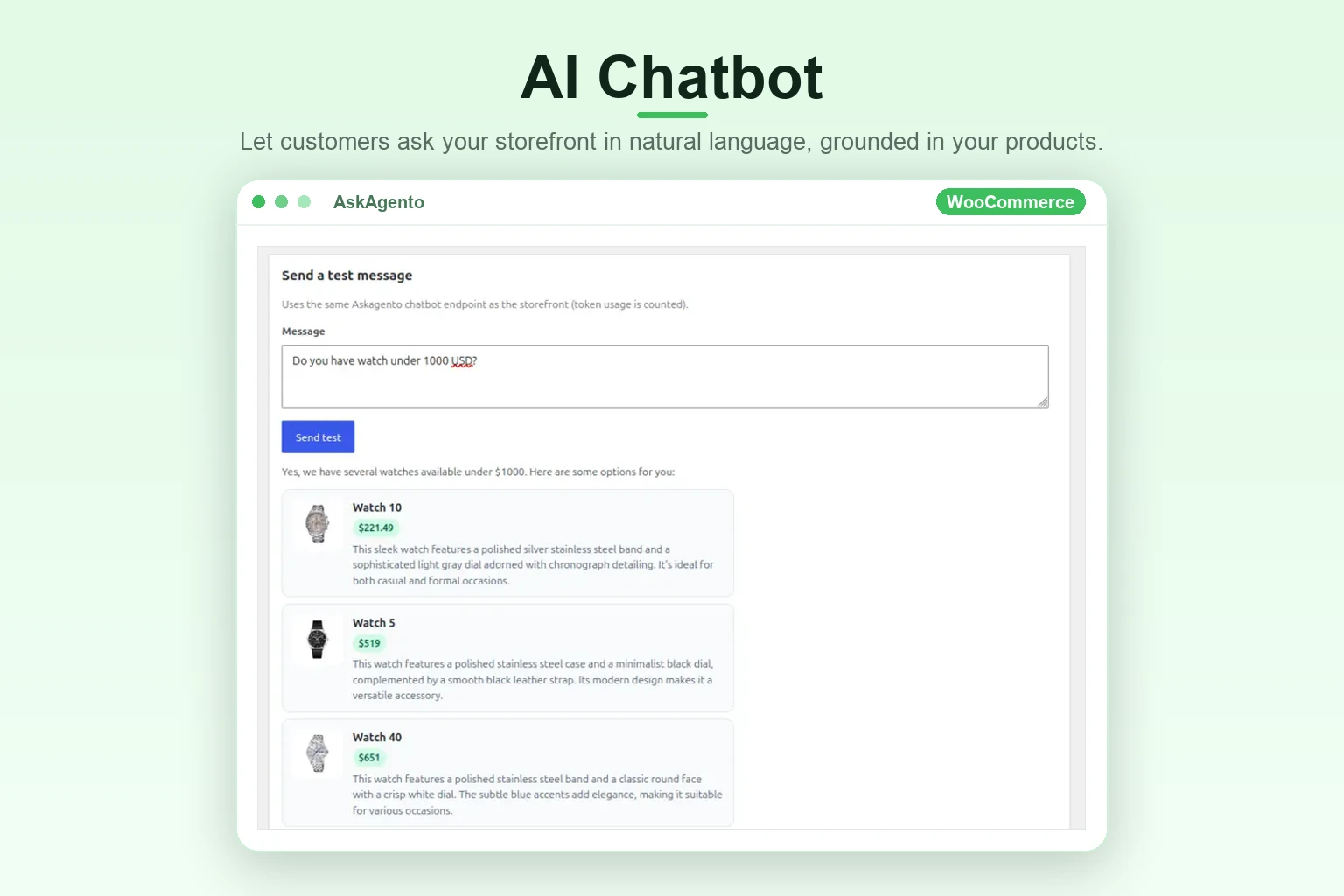
- Grounded AI chat — Storefront chatbot answers from retrieved products, not a generic model guessing your inventory.
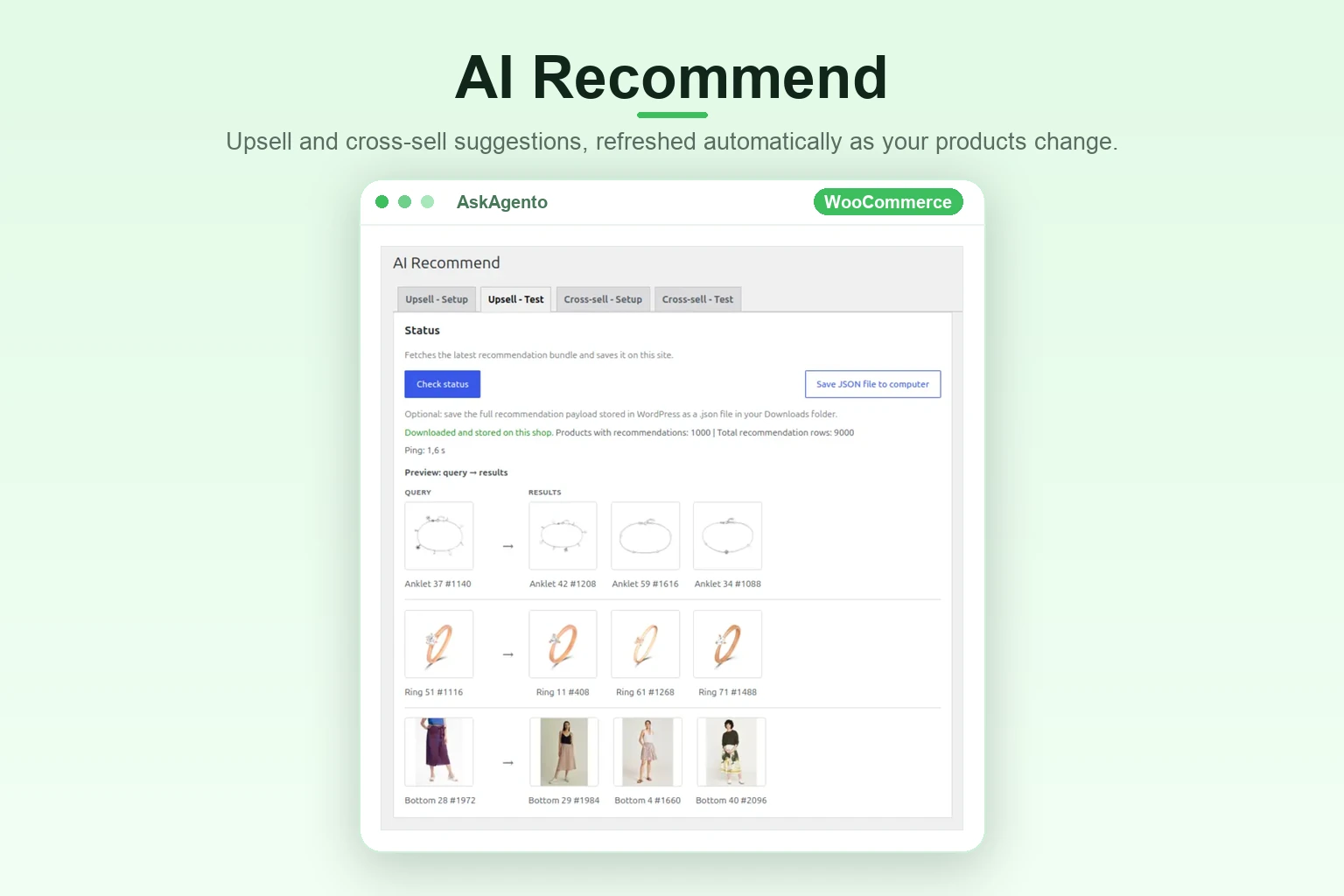
- Recommendations — Upsell and cross-sell suggestions tied to your synced catalogue.
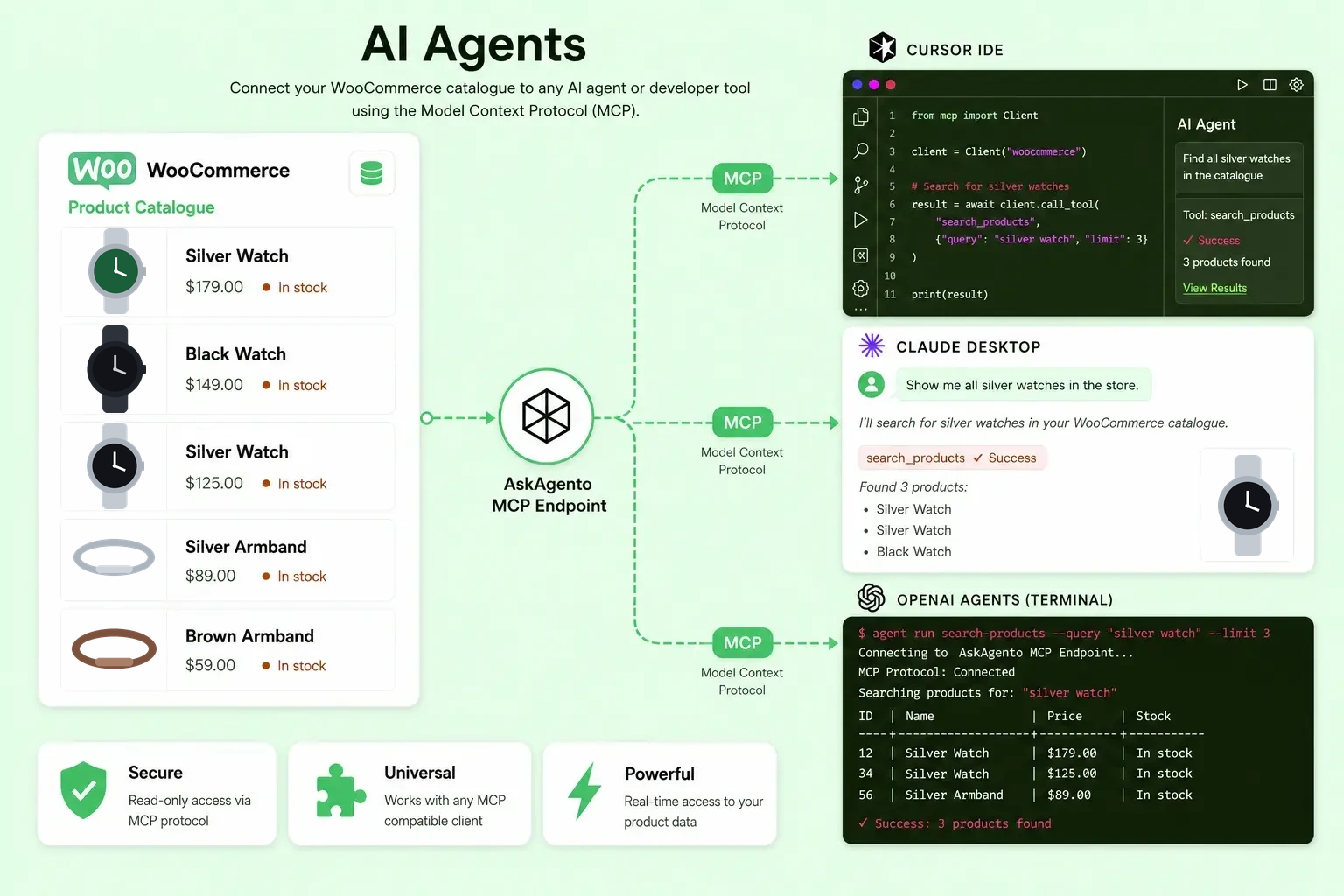
- Agents — Expose your shop to external tools via MCP for automations and copilots.
- Fast faceted filtering — Auto-generated product filters with pre-computed cache tables for responsive storefront filtering at scale.
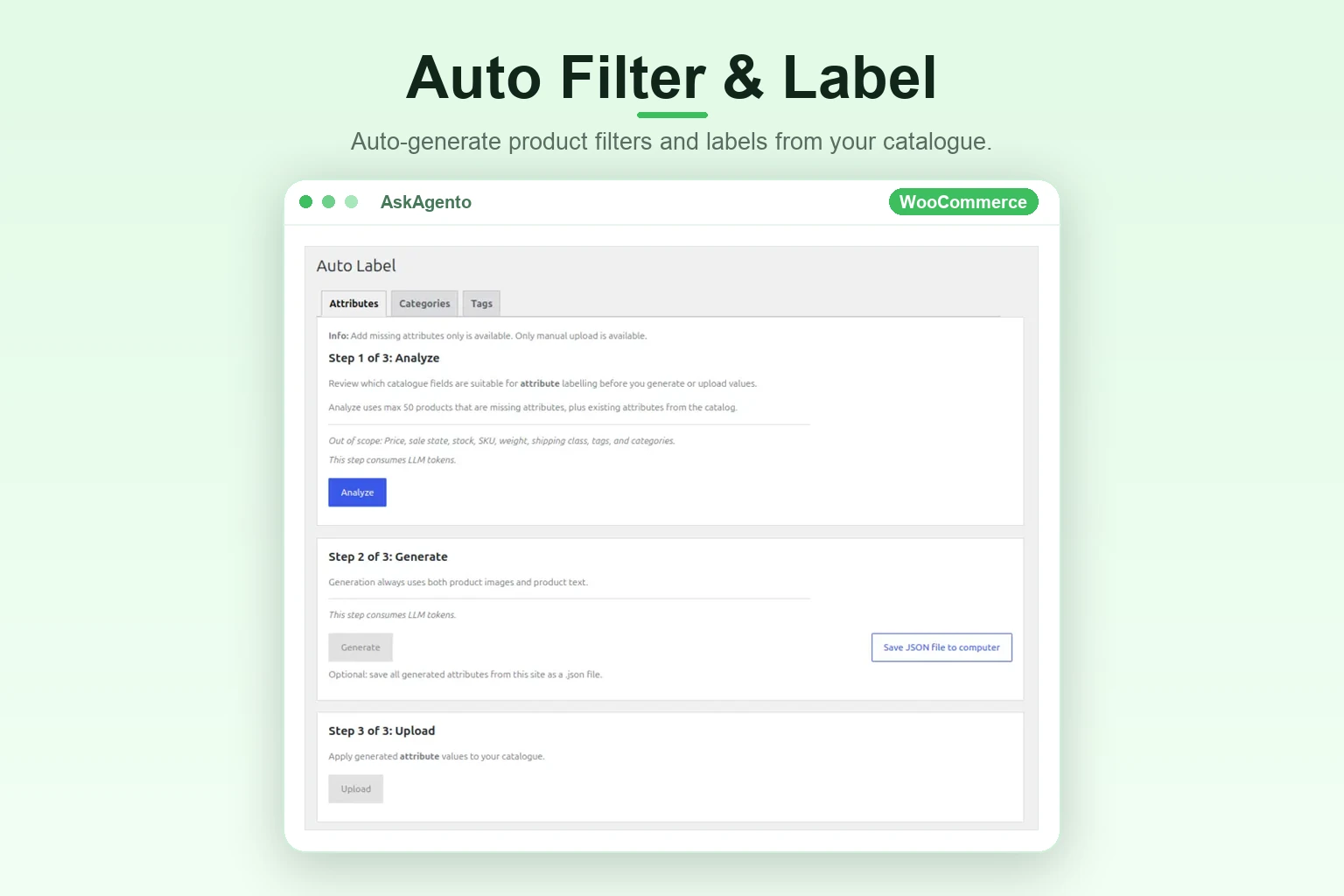
- Less manual catalogue work — Auto Label proposes attributes, categories, and tags from catalogue intelligence, with workflows to push results into WooCommerce.
- Optional BYOK — Bring your own LLM provider key to extend token-based features alongside your included service allowance.
Features
- AI text search on the storefront
- AI image search on the storefront
- AI Chatbot — natural-language shopping assistant
- AI Recommend — upsell and cross-sell blocks
- Auto Product Filters — generated from your catalogue
- Auto Label — analyse, generate, and upload attributes/tags/categories
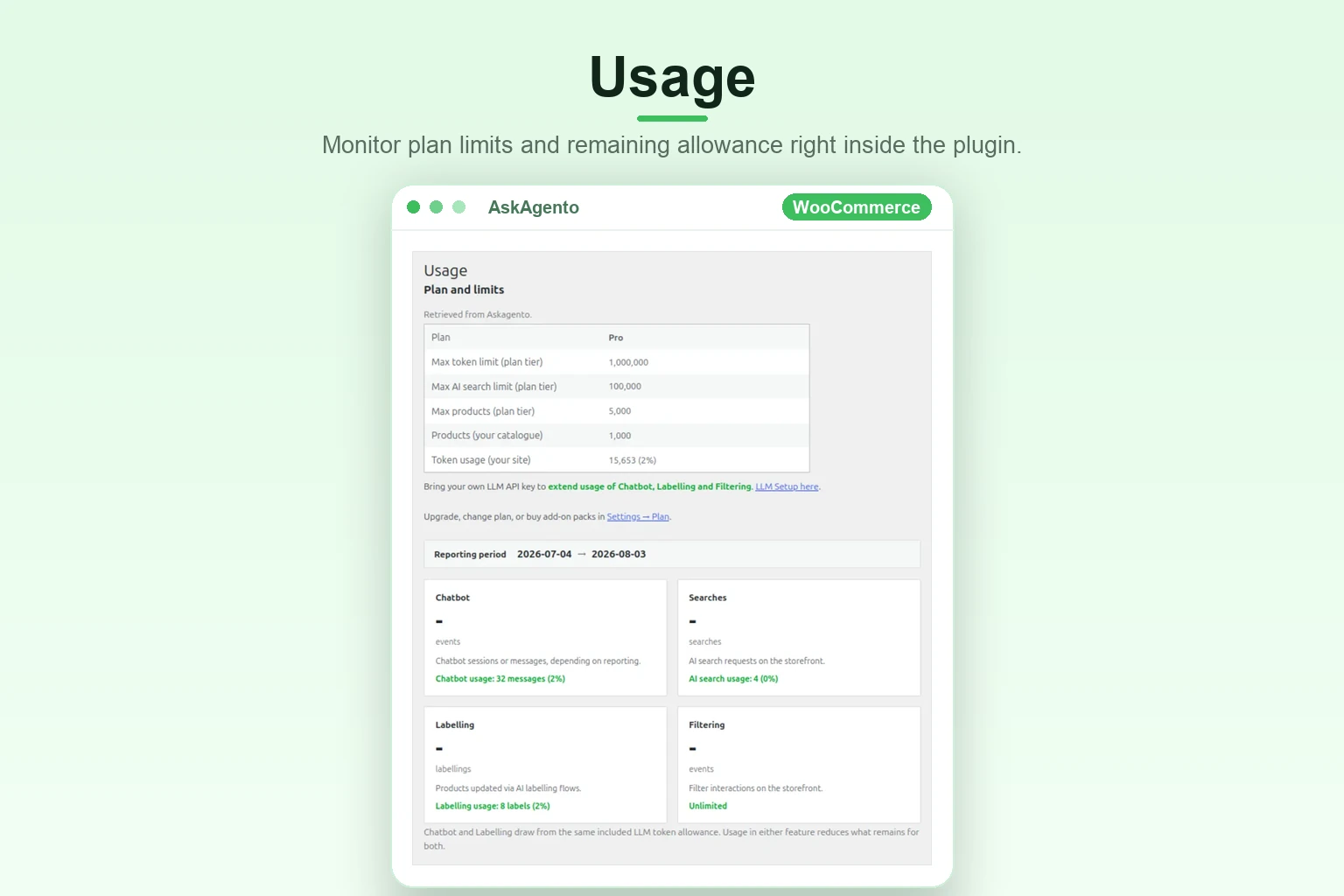
- Service usage and remaining allowance visible in wp-admin
- Scheduled daily catalogue sync
Service plans
This plugin is not trialware and contains no locked features. Every screen, setting and
feature ships enabled for everyone. There is no licence key, no trial period, and no code
path that disables functionality based on a subscription.
The AI features are performed by the AskAgento cloud service (see External services
below). Like any hosted service, it has capacity limits. Those limits live entirely on the
server and determine how much catalogue the service processes for your shop, not which
plugin features you may use:
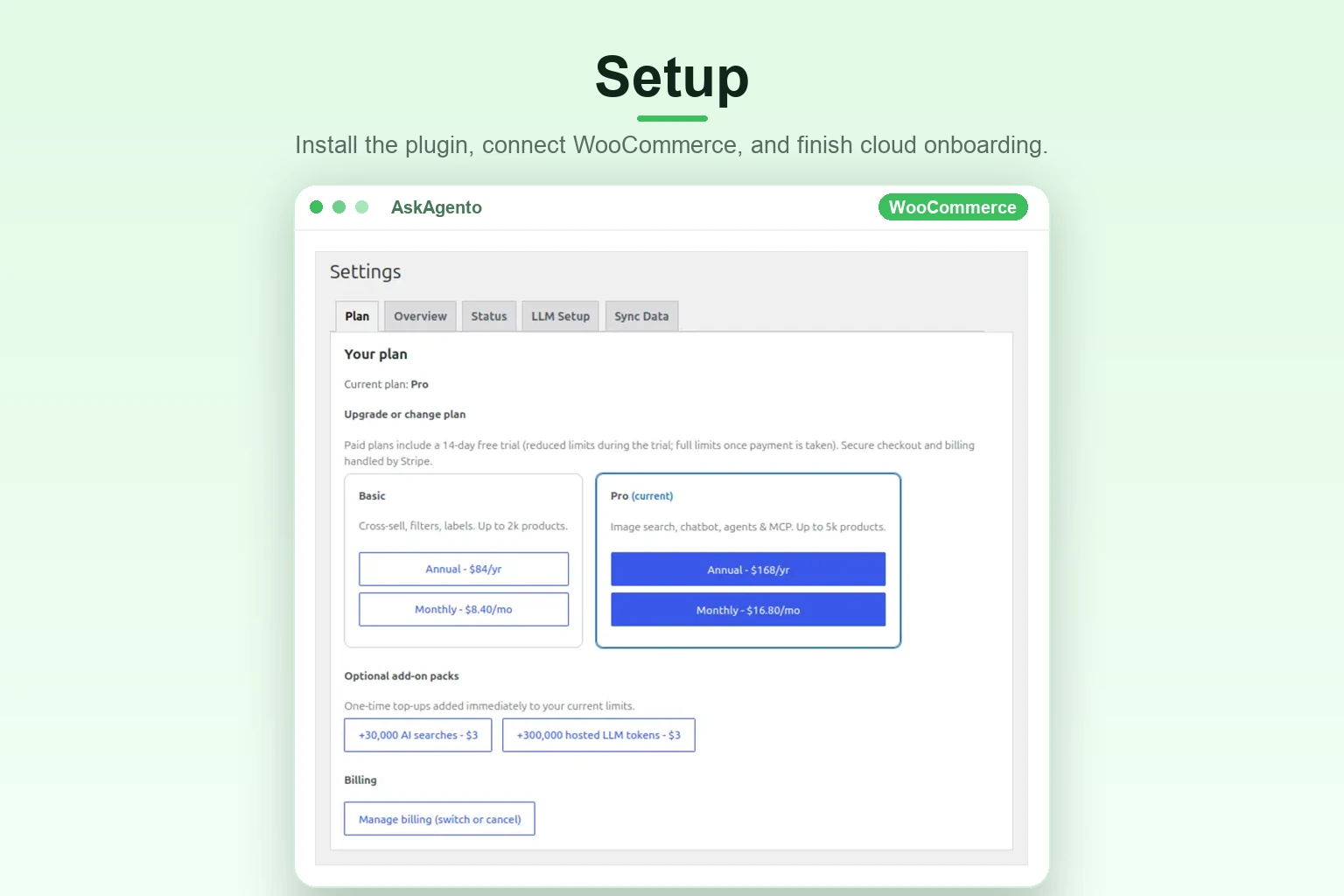
- Free — up to 100 products indexed, with a monthly AI usage allowance. No credit card.
- Basic — up to 2,000 products indexed, higher monthly allowances.
- Pro — up to 5,000 products indexed, the highest monthly allowances.
- Custom — agreed with sales for larger catalogues.
Every plan, including Free, runs the complete feature set: AI text search, AI image search,
chatbot, upsell and cross-sell recommendations, auto product filters, auto labels, and MCP
agents. If your catalogue grows past what your current plan indexes, the plugin keeps
working and shows an informational notice; see pricing.
Free is free forever — no credit card, no trial, no expiry date, and not one feature
locked or limited. Install the plugin and accept the consent notice on the Plugins screen
to connect your site; you are on the Free plan from that moment, with nothing to buy,
activate or upgrade.
Paid plans are optional and bought on askagento.com. They raise only how much catalogue the
service indexes and how much AI usage is included each month. If you already paid there,
link the subscription to this site under AskAgento Settings Status using the claim
code shown on the page you reached after paying.
API Documentation: askagento.com/api/
Tutorial videos: askagento.com/tutorial.html
Demo shop: demowp.askagento.com
Terms of use: askagento.com/terms.html
Privacy policy: askagento.com/privacy.html
Legal notice: askagento.com/imprint.html
External services
This plugin connects to AskAgento cloud services operated by VisualSearch GmbH to register your site, sync your WooCommerce catalogue, and run AI-powered search, filters, labelling, recommendations, chatbot, and MCP features.
Service: AskAgento API
Website: askagento.com
API endpoint: api.askagento.com
API documentation: askagento.com/api/
Tutorial videos: askagento.com/tutorial.html
Terms of use: askagento.com/terms.html
Privacy policy: askagento.com/privacy.html
Legal notice: askagento.com/imprint.html
What is sent and when
- Installation / status — Site URL, resolved shop host IPv4 (DNS lookup of your site URL hostname), WooCommerce version, plugin version, and registration identifiers.
- Catalogue sync — Product data required to build the search and filter index, such as product titles, descriptions, SKUs, attributes, categories, tags, images, stock status, and price fields as configured.
- AI search, chat, label, filter, recommend, MCP — Query text, optional images, product context, and site credentials needed to process requests on your synced catalogue.
- Usage — Your plan, service allowance, and remaining usage for this site.
Consent and account requirement
Features that call external services need a completed installation and an AskAgento account. A free account is available without a credit card and includes every feature. Catalogue sync starts only after the site administrator completes onboarding/consent in the WordPress admin.
Site keys: public and secret
Registering your site issues two keys. The secret key stays in your WordPress database and is only ever sent from your server to AskAgento. It controls catalogue sync, uninstall, AI provider keys, labels, filters, plan, usage and billing for your site, so it is never printed into a page.
The public key (it starts with pk_) is what your storefront uses. On pages with the chatbot or image search, the plugin puts your site ID and public key into the page (window.askagentoAiChatbotFront and the image search block’s data-api-key attribute) so visitors’ browsers can call AskAgento chat and search directly. Anyone who views the page source can read these values. The public key only allows chat, search and MCP requests against your catalogue. It cannot change or delete your data, read your account, or open billing. You also put the public key into AI agent configs (AskAgento AI Agents). Chat and search requests made with it count toward your plan’s usage allowance, like requests from your storefront.
Optional BYOK (bring your own LLM key) — third party AI providers
BYOK is optional and off by default. If you choose to add your own API key under AskAgento Settings LLM Setup, two things happen.
Key test (from your server to the provider): when a site administrator clicks “Test”, the plugin sends only the key you entered to the provider’s read-only models endpoint, as an authorization header or query parameter, to check that it works. No product, catalogue, customer or site data is sent in this request.
Hosted AI (from AskAgento to the provider): when you save a key for a provider AskAgento can run on (OpenAI or OpenRouter), the plugin sends the key once over HTTPS from your server to AskAgento, which stores it with your site’s registration. From then on AskAgento’s servers use your key to call that provider for your site’s AI requests, such as chatbot conversations and auto labels. Those requests carry the shopper’s message and the product details needed to answer it. Your plan’s AI token allowance is not charged for them, and the provider bills you directly. Clearing the key, or uninstalling the plugin, removes it from AskAgento as well.
In your WordPress database, provider keys are shown only in masked form in wp-admin and are removed when you clear them or uninstall the plugin. There are no requests to these providers from your storefront or visitors’ browsers.
Each provider is an independent third party service; its own terms and privacy policy apply to the requests described above and to any use you make of that provider’s API with your key.
- OpenAI — used to validate an OpenAI API key via api.openai.com/v1/models
Terms: openai.com/policies/services-agreement/ — Privacy policy: openai.com/policies/privacy-policy/ (all policies: openai.com/policies/) - Anthropic — used to validate an Anthropic API key via api.anthropic.com/v1/models
Terms: anthropic.com/legal/commercial-terms — Privacy policy: anthropic.com/legal/privacy - Google (Gemini API) — used to validate a Google Gemini API key via generativelanguage.googleapis.com/v1/models
Terms: developers.google.com/terms — Privacy policy: policies.google.com/privacy - OpenRouter — used to validate an OpenRouter API key via openrouter.ai/api/v1/models
Terms: openrouter.ai/terms — Privacy policy: openrouter.ai/privacy
Screenshots
Blocks
This plugin provides 2 blocks.
- AskAgento Product Filter
- AskAgento Product Filter (legacy)
Installation
Your shop must be publicly reachable. During setup our servers fetch your product pages and images, so installation from a password-protected, local (localhost / staging), or otherwise hidden shop will fail. This is checked before your catalogue is uploaded, and installation stops with the reason if the shop cannot be reached. Your catalogue also needs at least one product image, because products are indexed by their images.
- Install and activate AskAgento (WooCommerce must be active).
- On the Plugins screen, read the consent notice and click I Agree. Nothing leaves your shop before this. Clicking it registers your site, stores your site’s API keys, and starts the first catalogue upload automatically. There is no separate registration or first sync to run by hand.
- Wait for the first sync to finish. The notice estimates how long it will take from your catalogue size, and you can carry on working elsewhere. To see where it stands, go to AskAgento Settings Status and click Check status.
- If you bought Basic or Pro on askagento.com, link it now. Go to AskAgento Settings Status, find Connect a purchase made on askagento.com, paste the claim code shown on the page you reached after paying (it starts with
cs_), and click Link purchase. Then run a sync from AskAgento Settings Sync Data, because step 3 indexed only as many products as your previous plan allowed. - Configure features you need:
- AI Search — enable text and/or image search
- AI Chatbot — configure and test the assistant
- AI Recommend — add recommendation blocks or shortcodes
- AI Agents — MCP URL and credentials
- Auto Filter — create and place filters on shop pages
- Auto Label — analyse and apply catalogue labels
- Visit your storefront to verify search, filters, and widgets.
FAQ
-
Do I need WooCommerce?
-
Yes. AskAgento is built for WooCommerce product catalogues.
-
Do I need an AskAgento account?
-
Yes. The plugin uses AskAgento cloud services to sync your catalogue and provide AI-powered search, filters, labelling, recommendations, chatbot, and MCP features. You can start with the free plan, which includes every feature.
-
Does the plugin work without a paid subscription?
-
Yes, and it includes every feature: AI text search, AI image search, chatbot, upsell and cross-sell recommendations, auto product filters, auto labels, and MCP agents. The free plan indexes catalogues up to 100 products and includes a monthly AI usage allowance. Paid plans index larger catalogues (Basic 2,000 products, Pro 5,000) with higher allowances; they do not add features. See pricing.
-
I bought Basic or Pro on askagento.com. How do I activate it on my site?
-
Go to AskAgento Settings Status, find Connect a purchase made on askagento.com, paste your claim code, and click Link purchase. The claim code starts with
cs_and is shown on the askagento.com page you reached after paying. Only you see that page, which is what proves the purchase is yours. Your larger catalogue capacity and monthly allowances apply within about a minute. If you no longer have the code, email hi@askagento.com with your Stripe receipt and we will link it for you.Finish installation first. The field appears only once your site is registered, because the subscription is attached to this site’s registration. Linking changes your hosted service allowance only: the plugin is byte-for-byte the same on every plan, so there is nothing to re-install or update.
Add-on search and AI token packs bought on askagento.com are claimed the same way, each with the claim code from its own checkout.
-
How do I change plan, update my card, get invoices, or cancel?
-
On any paid plan, AskAgento Settings Status shows a Manage Stripe subscription button. It opens Stripe’s own billing portal, where you can switch plan, update your payment method, download invoices, or cancel. The plugin never handles your payment details. Changes made there apply to your site within about a minute.
If the button is missing, no billing account is linked to this site yet — link your subscription with its claim code first, as described above.
-
What data is sent to AskAgento?
-
During sync and AI requests, product and store data needed for search, filters, labelling, recommendations, and chat are sent to AskAgento infrastructure. This can include product titles, descriptions, SKUs, attributes, categories, tags, images, stock status, prices, site URL, plugin version, WooCommerce version, and registration identifiers. See the privacy policy.
-
Is customer personal data required?
-
No personal customer order history is required for core catalogue search, filters, labelling, recommendations, and chatbot features. The plugin is designed to process WooCommerce product catalogue data needed to provide the connected AskAgento features.
-
Does the plugin send catalogue data immediately on activation?
-
No. Activation alone does not send your catalogue. The catalogue transfer starts only after the site administrator completes the AskAgento onboarding/consent step in the WordPress admin.
-
Do I need my own OpenAI (or other) API key?
-
No for your included service allowance. You may optionally add your own LLM provider key under plugin settings (BYOK) for additional token-based usage. If you do, your WordPress site contacts that provider (OpenAI, Anthropic, Google Gemini, or OpenRouter) directly to verify the key, and that provider’s terms and privacy policy apply. See the External services section for exactly what is sent, when, and links to each provider’s terms and privacy policy.
-
How often does my catalogue update?
-
Your catalogue syncs once per day on every plan, anchored to your installation time. You can also sync on demand from AskAgento Settings Sync Data.
Reviews


Contributors & Developers
“AskAgento | AI Product Discovery” is open source software. The following people have contributed to this plugin.
Contributors
Translate “AskAgento | AI Product Discovery” into your language.
Interested in development?
Browse the code, check out the SVN repository, or subscribe to the development log by RSS.
Changelog
1.2.4
- Security: storefront pages now carry a separate public key instead of your site’s secret key. The public key only allows chat, search and MCP requests, so reading it from the page source no longer gives access to catalogue sync, uninstall, AI provider keys, plan, usage or billing. The secret key stays on your server. Existing sites must register again (deactivate and reactivate AskAgento) to get a public key; until then the storefront chatbot and image search stay off.
- Security: shop pages no longer accept filter parameters in the URL for fields that are not on one of your filters. Before this, a visitor could filter the catalogue by any product meta field, including private ones, by editing the URL. A malformed range parameter no longer causes a PHP error.
- Security: a subscription or add-on pack bought on askagento.com is now linked with the claim code shown after checkout, not with the billing email address. Anyone could type an email address; only the buyer sees the claim code.
- Fix: filter options whose slug is a number (for example sizes 36–44) returned no products when selected, although the filter listed them with a count. Numeric taxonomy slugs and meta values are now indexed like any other value. Filters that use numeric slugs need their cache rebuilt, which happens automatically when you save the filter.
- AI Agents and Settings Status show the public key for MCP configs, with the secret key listed separately and marked private. The Check status line no longer prints the secret key.
- Readme: corrected the BYOK section. A saved OpenAI or OpenRouter key is sent to AskAgento so the hosted AI can use it.
1.2.3
- The legacy
product-filter/filterblock, kept only so posts saved with the plugin’s old block name still render, now carries a proper title instead of being listed as “Product Filter Filter”. No change to how any block behaves. - External service URLs in this readme are now clickable links.
1.2.2
- Documentation only. No functional changes; the plugin code is unchanged.
1.2.1
- Documentation only. No functional changes; the plugin code is unchanged.
1.2.0
- New “Manage subscription” button in Settings Status, shown on any paid plan. It opens Stripe’s own billing portal, where you can change plan, update your card, download invoices or cancel your subscription. Previously there was no way to do any of that from wp-admin.
1.1.3
- Installation now checks that your shop is reachable from the internet before your catalogue is uploaded. Previously a local, staging, or password-protected shop was only detected part-way through installation, after the whole catalogue had been sent.
- The check is quick: it confirms the shop is not a local address, that its domain resolves publicly, and that one product image can actually be downloaded.
- If the shop cannot be reached, installation stops and the notice explains exactly what blocked it — a local address, a domain that does not resolve, a password-protected site, or images the service is not allowed to download.
- If the shop has no product images at all, installation stops and says so. Products are indexed by their images.
- If the check itself cannot reach a verdict (for example your shop was briefly slow), installation continues as before and shows an informational notice rather than blocking.
1.1.2
- AI text search now sends the search wording to the service as
textinstead ofquery, matching the renamed field in the public API and thesearch_productsagent tool. Searching, the admin search tester, and the MCP agent tester behave exactly as before. - No action is required: the service still accepts the previous field name, so search keeps working whichever version of the plugin you run.
1.1.1
- The activation consent screen now states that installation requires a publicly reachable shop. Password-protected, local, and hidden shops cannot be installed, because the service fetches product pages and images during setup.
- Documented the same requirement in the Installation instructions.
1.1.0
- Removed all feature gating from the plugin. Every feature — AI text search, AI image search, chatbot, upsell and cross-sell recommendations, auto product filters, auto labels, and MCP agents — is now enabled for every user, including the free plan. No plugin functionality is conditional on a subscription.
- Removed the install-time trial entirely. There is no trial period anywhere in the plugin or the service.
- Catalogue sync now runs once per day for every site, instead of monthly on the free plan.
- Service capacity is reported instead of enforced in the plugin: if your catalogue is larger than your plan indexes, the plugin keeps working and shows a dismissible informational notice linking to the pricing page.
- Removed the Plan tab and all in-admin purchasing. Subscriptions are bought on askagento.com; Settings Status and the Usage screen simply link there for higher service limits.
- Settings Status can link a subscription bought on askagento.com to this site by billing email. This changes the hosted service allowance only.
- Renamed the LLM key module to
includes/byok.phpand its functions to anaskagento_byok_*prefix. Stored option names are unchanged, so saved provider keys survive the update. - Addressed Plugin Check notices: storefront range filter values (
*_min/*_max) are now passed throughsanitize_text_field()before casting, and the block editor script declares$in_footerexplicitly.
1.0.7
- Plugin header now lists separate plugin and author URIs, as required for WordPress.org distribution.
1.0.6
- The “Powered by AskAgento” credit in the storefront chat panel is now optional and hidden by default. Turn it on under AI Chatbot Setup.
- The plan-limit notice no longer shows an upgrade link on unrelated admin screens; plan changes stay under AskAgento Settings Plan.
- Removed the bundled sample image from the plugin package.
1.0.5
- Completed the storefront documentation and refreshed readme details.
1.0.4
- Hardened security and WordPress coding-standards compliance: output escaping, input sanitization, nonce verification, and prepared database queries throughout.
- Prefixed all global functions and variables (
pf_/askagento_) to avoid conflicts with other plugins and themes. - Admin consent notice now stays visible until you click “I Agree”; updated privacy policy link.
- Build and packaging fixes (application files zip, Node version) and internal cleanup.
1.0.3
- Improved cross-sell recommendations: broader category coverage and multilingual matching so non-English shops get complementary suggestions too.
- Added interface translations — the plugin is now available in German, French, Spanish, and Italian (5 languages including English).
1.0.2
- Fixed plan handling: plan detection, gating, limits, and plan status display in wp-admin.
1.0.1
- Fixed upsell recommendations and issues from LLM testing.
1.0.0
Initial public release.
* Unified WooCommerce catalogue layer synced to AskAgento cloud.
* AI text search and image search (plan-dependent) on the storefront.
* Auto Product Filters with pre-computed cache tables; Product Filter widget and Gutenberg block (askagento/filter).
* Auto Label: analyse, generate, and upload attributes, tags, and categories.
* AI Chatbot storefront assistant grounded in your synced catalogue.
* AI Recommend: upsell and cross-sell blocks.
* Agents (Pro): expose your shop via MCP.
* Optional BYOK for OpenAI, Anthropic, Google (Gemini), and OpenRouter.
* Plan gating and usage reporting (plan, limits, and remaining allowance) in wp-admin.
* WooCommerce HPOS compatibility, AJAX capability checks, and uninstall cleanup.
* License: GPLv2 or later.